Social Media Image Sizes: The Complete Guide for 2026
Every social media image size you need in 2026: profile pictures, cover photos, post dimensions, and story sizes for Instagram, YouTube, Facebook, TikTok, LinkedIn, Pinterest, X, Discord, and more.
This guide covers the correct image dimensions for every major social media platform in 2026 — including Instagram, YouTube, TikTok, LinkedIn, Facebook, Pinterest, X/Twitter, Discord, Twitch, Spotify, Etsy, Tumblr, Threads, and SoundCloud — with platform-by-platform breakdowns and design tips for each.
Getting image sizes wrong on social media is one of those problems that looks unprofessional in ways that are hard to explain but immediately visible. A profile picture that's slightly off-ratio gets cropped in unexpected places. A cover photo that looked fine in your design tool comes out stretched or cut off on mobile. A post designed at the wrong dimensions loses sharpness when the platform resamples it.
None of these are catastrophic problems. But they're avoidable ones, and fixing them takes less time than explaining them to a client after the fact.
This guide covers the correct dimensions for every major platform in 2026. Use the quick-reference table to find what you need fast, or jump to a specific platform section for the full breakdown including profile images, cover photos, posts, stories, and any platform-specific formats.
What you'll learn in this guide:
- Why image sizes matter more than you think
- Quick reference: key image sizes by platform
- Social networks: Instagram, Facebook, X, LinkedIn, Threads, Tumblr
- Video platforms: YouTube, TikTok, Twitch
- Creative and discovery platforms: Pinterest, Etsy
- Audio platforms: Spotify, SoundCloud
- Gaming and community: Discord
- How platforms handle images differently
- Designing for multiple platforms at once
- File formats and export settings
- When sizes change: staying current
Quick reference: key image sizes by platform
The most commonly needed dimensions across all platforms. For complete specs including all format variations, jump to the platform section or the dedicated guide linked in each row.
| Platform | |
|---|---|
| Profile image | 320 × 320px |
| Cover / banner | — |
| Standard post | 1080 × 1080px (square) |
| Story / vertical | 1080 × 1920px |
| Platform | |
| Profile image | 170 × 170px |
| Cover / banner | 851 × 315px |
| Standard post | 1200 × 630px |
| Story / vertical | 1080 × 1920px |
| Platform | X / Twitter |
| Profile image | 400 × 400px |
| Cover / banner | 1500 × 500px |
| Standard post | 1200 × 675px |
| Story / vertical | — |
| Platform | |
| Profile image | 400 × 400px |
| Cover / banner | 1584 × 396px |
| Standard post | 1200 × 627px |
| Story / vertical | — |
| Platform | TikTok |
| Profile image | 200 × 200px |
| Cover / banner | — |
| Standard post | 1080 × 1920px |
| Story / vertical | 1080 × 1920px |
| Platform | YouTube |
| Profile image | 800 × 800px |
| Cover / banner | 2560 × 1440px |
| Standard post | 1280 × 720px (thumbnail) |
| Story / vertical | — |
| Platform | |
| Profile image | 165 × 165px |
| Cover / banner | — |
| Standard post | 1000 × 1500px |
| Story / vertical | — |
| Platform | Discord |
| Profile image | 128 × 128px |
| Cover / banner | 960 × 540px |
| Standard post | — |
| Story / vertical | — |
| Platform | Twitch |
| Profile image | 600 × 600px |
| Cover / banner | 1920 × 480px |
| Standard post | 1920 × 1080px (panels) |
| Story / vertical | — |
| Platform | Spotify |
| Profile image | 640 × 640px |
| Cover / banner | — |
| Standard post | 800 × 800px (canvas) |
| Story / vertical | — |
| Platform | Etsy |
| Profile image | 500 × 500px (shop icon) |
| Cover / banner | 3360 × 840px |
| Standard post | 2700 × 2025px (listing) |
| Story / vertical | — |
| Platform | Threads |
| Profile image | 400 × 400px |
| Cover / banner | — |
| Standard post | 1080 × 1080px |
| Story / vertical | 1080 × 1920px |
| Platform | Tumblr |
| Profile image | 128 × 128px |
| Cover / banner | 30000 × 1055px |
| Standard post | 1280px wide |
| Story / vertical | — |
| Platform | SoundCloud |
| Profile image | 800 × 800px |
| Cover / banner | 2480 × 520px |
| Standard post | — |
| Story / vertical | — |
| Platform | Profile image | Cover / banner | Standard post | Story / vertical |
|---|---|---|---|---|
| 320 × 320px | — | 1080 × 1080px (square) | 1080 × 1920px | |
| 170 × 170px | 851 × 315px | 1200 × 630px | 1080 × 1920px | |
| X / Twitter | 400 × 400px | 1500 × 500px | 1200 × 675px | — |
| 400 × 400px | 1584 × 396px | 1200 × 627px | — | |
| TikTok | 200 × 200px | — | 1080 × 1920px | 1080 × 1920px |
| YouTube | 800 × 800px | 2560 × 1440px | 1280 × 720px (thumbnail) | — |
| 165 × 165px | — | 1000 × 1500px | — | |
| Discord | 128 × 128px | 960 × 540px | — | — |
| Twitch | 600 × 600px | 1920 × 480px | 1920 × 1080px (panels) | — |
| Spotify | 640 × 640px | — | 800 × 800px (canvas) | — |
| Etsy | 500 × 500px (shop icon) | 3360 × 840px | 2700 × 2025px (listing) | — |
| Threads | 400 × 400px | — | 1080 × 1080px | 1080 × 1920px |
| Tumblr | 128 × 128px | 30000 × 1055px | 1280px wide | — |
| SoundCloud | 800 × 800px | 2480 × 520px | — | — |
All dimensions in pixels. Sizes reflect current platform specifications as of April 2026, check individual platform guides for the latest updates.
Why image sizes matter more than you think
The obvious reason to use correct image sizes is visual quality — images uploaded at the right dimensions look sharp and render correctly across devices. But there are a few less obvious reasons that matter just as much.
Cropping is algorithm-controlled. Most platforms crop images automatically to fit their display format. Upload a profile photo that's not square, and the platform will crop it — not necessarily in a way that keeps your face or logo centred. Designing to the exact spec means you control what gets shown, not the platform's crop logic.
Compression is unavoidable, but manageable. Every platform resamples images on upload — they convert your file to their preferred format and resolution. If you upload an image that's already at the platform's exact dimensions, the resampling has less work to do and the result is cleaner. Uploading a very large image isn't always better — some platforms apply more aggressive compression to oversized files.
Display varies by device. A cover photo that looks correct on desktop may crop differently on mobile. Most platforms display images differently across their apps and web versions, which is why platform-specific guides matter — the safe zones and cropping logic differ across devices, and the specs account for this.
Consistency builds recognition. Profiles that are visually consistent across platforms — same profile image, same colour treatment, same logo proportions — build brand recognition faster than profiles that look different on every platform. Getting sizes right is the first step to that consistency.

Consistency across platforms also depends on having a clear visual identity to begin with. The illustration styles guide covers how to build a visual system — colour, style, and character — that translates reliably across different formats and contexts.
Social networks
Instagram is a visually-driven platform where image quality is particularly visible — low-quality or incorrectly sized images stand out more here than on most other platforms.
Key sizes:
| Format | Profile image |
|---|---|
| Dimensions | 320 × 320px (displayed at 110px) |
| Aspect ratio | 1:1 |
| Format | Square post |
| Dimensions | 1080 × 1080px |
| Aspect ratio | 1:1 |
| Format | Portrait post |
| Dimensions | 1080 × 1350px |
| Aspect ratio | 4:5 |
| Format | Landscape post |
| Dimensions | 1080 × 566px |
| Aspect ratio | 1.91:1 |
| Format | Story / Reel |
| Dimensions | 1080 × 1920px |
| Aspect ratio | 9:16 |
| Format | Dimensions | Aspect ratio |
|---|---|---|
| Profile image | 320 × 320px (displayed at 110px) | 1:1 |
| Square post | 1080 × 1080px | 1:1 |
| Portrait post | 1080 × 1350px | 4:5 |
| Landscape post | 1080 × 566px | 1.91:1 |
| Story / Reel | 1080 × 1920px | 9:16 |
The 4:5 portrait format (1080 × 1350px) takes up the most vertical space in the feed and tends to perform well for visibility. Instagram compresses images on upload, uploading at exactly 1080px wide prevents the platform from downscaling before compression, which preserves quality.
Stories and Reels use 9:16 vertical format. When designing for stories, keep key content within the central 1080 × 1420px safe zone, the top and bottom 250px can be obscured by the UI.
Full specs and examples: Instagram size guide
Facebook has more image format variations than almost any other platform: cover photos, event images, group headers, link previews, and ads all have different requirements. For most users, the three most important formats are the profile image, cover photo, and standard post image.
Key sizes:
| Format | Profile image |
|---|---|
| Dimensions | 170 × 170px (desktop) |
| Notes | Displayed as a circle |
| Format | Cover photo |
| Dimensions | 851 × 315px |
| Notes | Crops differently on mobile (640 × 360px visible) |
| Format | Shared image |
| Dimensions | 1200 × 630px |
| Notes | Most reliable for link previews |
| Format | Story |
| Dimensions | 1080 × 1920px |
| Notes | 9:16 vertical |
| Format | Event cover |
| Dimensions | 1920 × 1005px |
| Notes | — |
| Format | Dimensions | Notes |
|---|---|---|
| Profile image | 170 × 170px (desktop) | Displayed as a circle |
| Cover photo | 851 × 315px | Crops differently on mobile (640 × 360px visible) |
| Shared image | 1200 × 630px | Most reliable for link previews |
| Story | 1080 × 1920px | 9:16 vertical |
| Event cover | 1920 × 1005px | — |
The cover photo is one of the trickiest Facebook formats because the visible area changes between desktop and mobile. Designing to 851 × 315px but keeping key content centred within the safe zone (approximately 820 × 312px) ensures nothing important gets cut off on either.
Full specs and examples: Facebook size guide
X / Twitter
X uses a horizontal banner format that's unusual compared to most platforms — the 3:1 aspect ratio is wide and shallow, which suits typographic and landscape-oriented designs more than portraits.
Key sizes:
| Format | Profile image |
|---|---|
| Dimensions | 400 × 400px |
| Notes | Displayed as a circle |
| Format | Header / banner |
| Dimensions | 1500 × 500px |
| Notes | 3:1 ratio — keep key content away from edges |
| Format | Post image |
| Dimensions | 1200 × 675px |
| Notes | 16:9 — cropped in feed; click to expand |
| Format | Card image |
| Dimensions | 800 × 418px |
| Notes | Used for link previews |
| Format | Dimensions | Notes |
|---|---|---|
| Profile image | 400 × 400px | Displayed as a circle |
| Header / banner | 1500 × 500px | 3:1 ratio — keep key content away from edges |
| Post image | 1200 × 675px | 16:9 — cropped in feed; click to expand |
| Card image | 800 × 418px | Used for link previews |
Images in the X feed are cropped to approximately 16:9 ratio on most devices. The full image only shows when a user clicks through. Design for the crop first — ensure the key visual element is in the central area of the image rather than at the edges.
Full specs and examples: X / Twitter size guide
LinkedIn sits in a different context to most social platforms — it's primarily a professional network, and visual content here tends toward clean, structured design rather than the more expressive styles that work on Instagram or Pinterest.
Key sizes:
| Format | Profile image |
|---|---|
| Dimensions | 400 × 400px |
| Notes | Displayed as a circle |
| Format | Cover / banner |
| Dimensions | 1584 × 396px |
| Notes | 4:1 ratio — wide and shallow |
| Format | Company logo |
| Dimensions | 300 × 300px |
| Notes | Square, displayed small |
| Format | Post image |
| Dimensions | 1200 × 627px |
| Notes | 1.91:1 ratio |
| Format | Article cover |
| Dimensions | 1920 × 1080px |
| Notes | Used for published articles |
| Format | Dimensions | Notes |
|---|---|---|
| Profile image | 400 × 400px | Displayed as a circle |
| Cover / banner | 1584 × 396px | 4:1 ratio — wide and shallow |
| Company logo | 300 × 300px | Square, displayed small |
| Post image | 1200 × 627px | 1.91:1 ratio |
| Article cover | 1920 × 1080px | Used for published articles |
The company page banner (1584 × 396px) is another wide, shallow format. Because it's proportionally quite extreme, it works best with horizontal compositions, landscape photography, or patterns and abstract backgrounds. Logos and centred text can look isolated in this format.
Full specs and examples: LinkedIn size guide
Threads
Threads, Meta's text-first platform, has simpler image requirements than its sibling platforms. The focus is on quick, conversational posts rather than polished visual content — but image quality still matters for brand accounts and visual-forward creators.
Key sizes:
| Format | Profile image |
|---|---|
| Dimensions | 400 × 400px |
| Notes | Synced with Instagram by default |
| Format | Post image |
| Dimensions | 1080 × 1080px |
| Notes | Square — most reliable format |
| Format | Portrait post |
| Dimensions | 1080 × 1350px |
| Notes | 4:5 |
| Format | Story |
| Dimensions | 1080 × 1920px |
| Notes | Via Instagram integration |
| Format | Dimensions | Notes |
|---|---|---|
| Profile image | 400 × 400px | Synced with Instagram by default |
| Post image | 1080 × 1080px | Square — most reliable format |
| Portrait post | 1080 × 1350px | 4:5 |
| Story | 1080 × 1920px | Via Instagram integration |
Full specs and examples: Threads size guide
Tumblr
Tumblr has a more flexible image handling system than most platforms — it accepts a wide range of sizes and displays them fluidly within the dashboard layout. The primary constraint is width rather than strict pixel dimensions.
Key sizes:
| Format | Profile image |
|---|---|
| Dimensions | 128 × 128px |
| Notes | Square |
| Format | Header image |
| Dimensions | 3000 × 1055px |
| Notes | Crops to 1500 × 500px on most views |
| Format | Post image |
| Dimensions | 1280px wide (max) |
| Notes | Height is flexible |
| Format | Dimensions | Notes |
|---|---|---|
| Profile image | 128 × 128px | Square |
| Header image | 3000 × 1055px | Crops to 1500 × 500px on most views |
| Post image | 1280px wide (max) | Height is flexible |
Full specs and examples: Tumblr size guide
Video platforms
YouTube
YouTube's image assets split into two very different design problems: the channel art (which spans an enormous range of screen sizes from mobile to 4K TV) and the thumbnail (which is small but arguably the most important image on the platform for driving clicks).
Key sizes:
| Format | Channel icon |
|---|---|
| Dimensions | 800 × 800px |
| Notes | Displayed at much smaller sizes |
| Format | Channel art / banner |
| Dimensions | 2560 × 1440px |
| Notes | Safe zone: 1546 × 423px (visible on all devices) |
| Format | Video thumbnail |
| Dimensions | 1280 × 720px |
| Notes | 16:9 — minimum 640px wide |
| Format | End screen |
| Dimensions | 1920 × 1080px |
| Notes | — |
| Format | Watermark |
| Dimensions | 150 × 150px |
| Notes | Branding overlay |
| Format | Dimensions | Notes |
|---|---|---|
| Channel icon | 800 × 800px | Displayed at much smaller sizes |
| Channel art / banner | 2560 × 1440px | Safe zone: 1546 × 423px (visible on all devices) |
| Video thumbnail | 1280 × 720px | 16:9 — minimum 640px wide |
| End screen | 1920 × 1080px | — |
| Watermark | 150 × 150px | Branding overlay |
The channel banner safe zone is critical to understand. The full 2560 × 1440px image only shows on TVs. On desktop, a narrower strip is visible. On mobile, a very narrow band. Design the core content — logo, channel name, any key text — within the central 1546 × 423px safe zone, and use the outer areas for background design only.
Thumbnails deserve particular attention. At small sizes in search results and recommendations, your thumbnail is competing with dozens of others for a click. High contrast, readable text, and a clear focal point at the dimensions the thumbnail actually appears at (often as small as 120 × 68px in recommendations) matters far more than sharpness at full size.
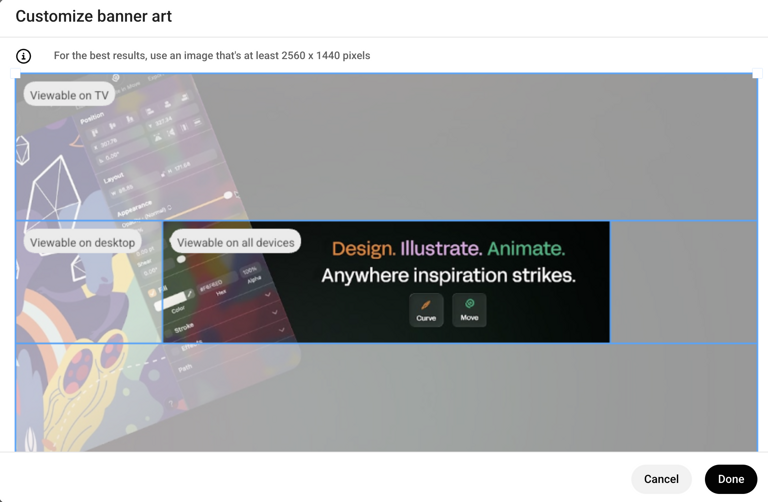
YouTube channel art displays very differently across devices, designing only within the safe zone ensures the key content is always visible.
Full specs and examples: YouTube size guide
TikTok
TikTok is almost entirely vertical video, which means its image design requirements are dominated by the 9:16 format. The profile image is small and almost always displayed as a circle in motion — it needs to be recognisable at very small sizes.
Key sizes:
| Format | Profile image |
|---|---|
| Dimensions | 200 × 200px |
| Notes | Displayed as a circle, often animated |
| Format | Video / post |
| Dimensions | 1080 × 1920px |
| Notes | 9:16 vertical — primary format |
| Format | Safe zone |
| Dimensions | 1080 × 1420px (central) |
| Notes | Avoid top/bottom 250px for UI overlap |
| Format | Dimensions | Notes |
|---|---|---|
| Profile image | 200 × 200px | Displayed as a circle, often animated |
| Video / post | 1080 × 1920px | 9:16 vertical — primary format |
| Safe zone | 1080 × 1420px (central) | Avoid top/bottom 250px for UI overlap |
For image posts on TikTok, the 9:16 vertical format is the default. Safe zone rules are particularly important here — TikTok's UI overlays (username, caption, interaction buttons) sit at the bottom of the screen and can obscure content that extends to the edge of the frame.
Full specs and examples: TikTok size guide
Twitch
Twitch image assets divide into channel branding (profile, banner, panels) and stream-specific assets (overlays, thumbnails). For most streamers and brand accounts, the channel panel images are the most design-intensive format — they function as a persistent information layout below the stream.
Key sizes:
| Profile image | Profile image |
|---|---|
| Dimensions | 600 × 600px |
| Notes | Displayed as a circle |
| Profile image | Channel banner |
| Dimensions | 1920 × 480px |
| Notes | Wide, shallow format |
| Profile image | Offline banner |
| Dimensions | 1920 × 1080px |
| Notes | Shown when not live |
| Profile image | Panel image |
| Dimensions | 320 × 160px |
| Notes | Repeatable — used for about, socials, schedule |
| Profile image | Stream thumbnail |
| Dimensions | 1920 × 1080px |
| Notes | 16:9 |
| Profile image | Dimensions | Notes |
|---|---|---|
| Profile image | 600 × 600px | Displayed as a circle |
| Channel banner | 1920 × 480px | Wide, shallow format |
| Offline banner | 1920 × 1080px | Shown when not live |
| Panel image | 320 × 160px | Repeatable — used for about, socials, schedule |
| Stream thumbnail | 1920 × 1080px | 16:9 |
Channel panels (320 × 160px each) are displayed in a row below the stream. They're small but high-traffic — most viewers scroll to them to find social links, schedules, and donation information. Clear, high-contrast design at this size is more important than decoration.
Full specs and examples: Twitch size guide
Creative and discovery platforms
Pinterest is one of the few social platforms where portrait-format images have a systematic advantage. The platform's grid layout rewards tall images — they take up more vertical space and are visually more prominent than square or landscape formats.
Key sizes:
| Format | Profile image |
|---|---|
| Dimensions | 165 × 165px |
| Aspect ratio | 1:1 |
| Format | Standard pin |
| Dimensions | 1000 × 1500px |
| Aspect ratio | 2:3 — optimal |
| Format | Long pin |
| Dimensions | 1000 × 2100px |
| Aspect ratio | Max recommended height |
| Format | Board cover |
| Dimensions | 800 × 450px |
| Aspect ratio | 16:9 |
| Format | Dimensions | Aspect ratio |
|---|---|---|
| Profile image | 165 × 165px | 1:1 |
| Standard pin | 1000 × 1500px | 2:3 — optimal |
| Long pin | 1000 × 2100px | Max recommended height |
| Board cover | 800 × 450px | 16:9 |
The 2:3 ratio (1000 × 1500px) is Pinterest's recommended format and consistently performs well across both mobile and desktop. Longer pins (up to 1000 × 2100px) can work for step-by-step or infographic content, but extremely long pins are sometimes cropped in the feed.
Text overlays work well on Pinterest — the platform's users often save images for reference, and text that explains what the image is about helps with that. Keep overlaid text large enough to read at the small preview sizes the grid displays.
Full specs and examples: Pinterest size guide
Etsy
Etsy has one of the more complex image requirements of any platform in this guide — shop listings, shop banner, shop icon, and team logos all have different specs, and product listing images have additional guidelines around aspect ratios that affect how items appear in search.
Key sizes:
| Format | Shop icon |
|---|---|
| Dimensions | 500 × 500px |
| Notes | Displayed at 75px in search |
| Format | Shop banner (mini) |
| Dimensions | 1200 × 160px |
| Notes | Narrow banner option |
| Format | Shop banner (big) |
| Dimensions | 3360 × 840px |
| Notes | Full-width option |
| Format | Listing image |
| Dimensions | 2700 × 2025px |
| Notes | 4:3 — appears at 570px in search |
| Format | About banner |
| Dimensions | 1200 × 300px |
| Notes | — |
| Format | Dimensions | Notes |
|---|---|---|
| Shop icon | 500 × 500px | Displayed at 75px in search |
| Shop banner (mini) | 1200 × 160px | Narrow banner option |
| Shop banner (big) | 3360 × 840px | Full-width option |
| Listing image | 2700 × 2025px | 4:3 — appears at 570px in search |
| About banner | 1200 × 300px | — |
Listing images are arguably the most important asset for an Etsy seller — they're the primary driver of clicks in search results. Etsy recommends a minimum of 2000px on the shortest side to ensure quality across zoom and full-size views. The 4:3 ratio (2700 × 2025px) is the safest format for consistent display.

Etsy uses multiple distinct image formats across the shop page, each has different dimensions and appears at very different display sizes.
Full specs and examples: Etsy size guide
Audio platforms
Spotify
Spotify's image requirements are almost entirely square — the platform's visual language is built around album-art proportions. The key difference from most platforms is that images here need to look good both at very small sizes (the mini player) and relatively large ones (the full player view).
Key sizes:
| Format | Artist image |
|---|---|
| Dimensions | 750 × 750px minimum (3000 × 3000px recommended) |
| Notes | Displayed in various crops |
| Format | Album / single cover |
| Dimensions | 640 × 640px minimum (3000 × 3000px recommended) |
| Notes | 1:1 — strict square |
| Format | Podcast cover |
| Dimensions | 1400 × 1400px minimum (3000 × 3000px recommended) |
| Notes | 1:1 |
| Format | Canvas (looping visual) |
| Dimensions | 720 × 1280px |
| Notes | 9:16 vertical video / image |
| Format | Dimensions | Notes |
|---|---|---|
| Artist image | 750 × 750px minimum (3000 × 3000px recommended) | Displayed in various crops |
| Album / single cover | 640 × 640px minimum (3000 × 3000px recommended) | 1:1 — strict square |
| Podcast cover | 1400 × 1400px minimum (3000 × 3000px recommended) | 1:1 |
| Canvas (looping visual) | 720 × 1280px | 9:16 vertical video / image |
Spotify enforces a minimum size for cover art, but recommends uploading at 3000 × 3000px for best quality across all display contexts. Cover art gets displayed at sizes ranging from 40px (mini player) to 640px (desktop full view) — it needs to work at both extremes, which means simple, bold, high-contrast designs tend to perform better than detailed ones.
Full specs and examples: Spotify size guide
SoundCloud
SoundCloud's design is similarly oriented around square artwork. The cover image is the primary visual asset — SoundCloud doesn't have the kind of rich profile customisation that Spotify or YouTube offer.
Key sizes:
| Format | Profile image |
|---|---|
| Dimensions | 800 × 800px |
| Notes | Displayed at smaller sizes |
| Format | Track / playlist artwork |
| Dimensions | 800 × 800px minimum |
| Notes | 1:1 square |
| Format | Header image |
| Dimensions | 2480 × 520px |
| Notes | Wide, shallow banner |
| Format | Dimensions | Notes |
|---|---|---|
| Profile image | 800 × 800px | Displayed at smaller sizes |
| Track / playlist artwork | 800 × 800px minimum | 1:1 square |
| Header image | 2480 × 520px | Wide, shallow banner |
The header image (2480 × 520px) follows the same wide-and-shallow pattern as several other platform banners. It crops differently on mobile, so keeping key content in the central portion of the image is important.
Full specs and examples: SoundCloud size guide
Gaming and community: Discord
Discord's image requirements are relatively minimal compared to content-publishing platforms — the primary assets are the server icon, banner, and individual user avatars. The platform's visual context is typically darker than most social platforms, which is worth considering when designing assets for it.
Key sizes:
| Format | User avatar |
|---|---|
| Dimensions | 128 × 128px |
| Notes | Displayed as a circle |
| Format | Server icon |
| Dimensions | 512 × 512px |
| Notes | Displayed as a circle or rounded square |
| Format | Server banner |
| Dimensions | 960 × 540px |
| Notes | 16:9 — shown at top of server sidebar |
| Format | Server splash |
| Dimensions | 1920 × 1080px |
| Notes | Background for invite screens |
| Format | Emoji |
| Dimensions | 128 × 128px |
| Notes | PNG with transparency |
| Format | Dimensions | Notes |
|---|---|---|
| User avatar | 128 × 128px | Displayed as a circle |
| Server icon | 512 × 512px | Displayed as a circle or rounded square |
| Server banner | 960 × 540px | 16:9 — shown at top of server sidebar |
| Server splash | 1920 × 1080px | Background for invite screens |
| Emoji | 128 × 128px | PNG with transparency |
Server icons are displayed very small in the server list — as small as 48px in the sidebar. At that size, detailed illustrations and small text become illegible. The most effective server icons are bold, simple, and recognisable as a shape alone.
Custom emoji (128 × 128px) should always use transparent backgrounds so they integrate cleanly with Discord's dark and light themes.
Full specs and examples: Discord size guide
How platforms handle images differently
Understanding why platforms have different size requirements helps you make better decisions when adapting the same asset across multiple platforms.
Display context varies. A profile image on LinkedIn is viewed in a professional context at relatively large sizes. A profile image on Discord is viewed in a gaming context at very small sizes. The same image may need to be designed or cropped differently for each even if the pixel dimensions are similar.
Aspect ratio enforcement differs. Some platforms enforce strict aspect ratios and crop automatically (Instagram, TikTok). Others display images at their native ratio up to a maximum width (Tumblr). Others show a cropped preview in feeds but expand to the full image on click (X/Twitter). Knowing which type of platform you're working with changes how you should compose an image.
Compression algorithms vary. Instagram applies relatively aggressive compression, particularly on videos. YouTube is less aggressive on still images. Spotify and SoundCloud treat cover art carefully because it's a primary visual element. The right export settings — file format, quality level, colour profile — differ accordingly.
Safe zones are not standardised. Every platform with a banner or cover photo has its own safe zone logic — the area that's consistently visible across device sizes. These are not the same across platforms, and designing to a generic "safe zone" without knowing the platform's specific behaviour is a common source of incorrectly cropped banners.
Designing for multiple platforms at once
Most designers working with brand accounts or content creators need to produce assets for multiple platforms simultaneously. Designing each one from scratch at the correct dimensions is time-consuming and creates consistency problems.
A more efficient approach:
Design at the largest required size first. Start with the highest-resolution version needed — often 3000 × 3000px for cover art or 2560 × 1440px for YouTube channel art — then scale down or crop for smaller formats. Going in the other direction (scaling up) always loses quality.
Identify a common safe zone across formats. When the same content needs to work as a square (Instagram), a 16:9 horizontal (YouTube), and a 9:16 vertical (TikTok), there's a central region that appears in all three. Design the core content — logo, key visual, essential text — within that central area, and use the surrounding space for supporting elements that can be cropped away.
Build a template system. For recurring content formats — weekly posts, release announcements, event promotions — a template system with artboards at each platform's required dimensions saves significant time. Tools like Linearity Curve let you work across multiple artboards in the same file, which makes this kind of multi-format design practical rather than laborious.
Most professional social media workflows settle on one primary tool for asset creation. Linearity Curve handles multi-artboard vector work natively on Mac and iPad, useful when you need to produce the same asset at five different dimensions without leaving the file. Adobe Illustrator covers the same ground with more complexity and a higher cost. Affinity Designer (now part of Canva) is a capable one-time-purchase alternative that works well for batch asset production. For teams that design and hand off in one place, Figma is where most social asset work happens collaboratively.
Maintain a master asset library. Keep source files for profile images, logos, and cover photos at their highest-quality versions. Export platform-specific versions from the master rather than re-editing the exported version when specs change.
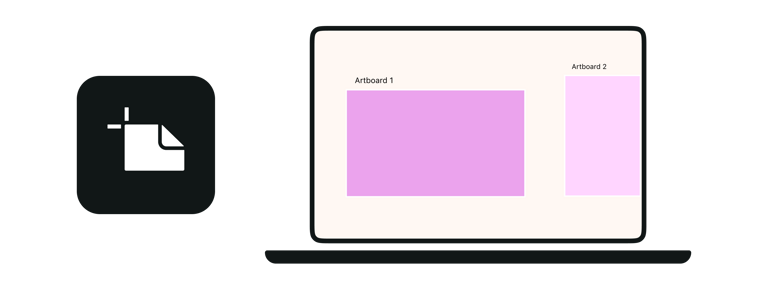
Designing across multiple artboards in the same file makes multi-platform consistency significantly easier to maintain.
The design principles behind multi-format work, composition, hierarchy, and safe zone logic, are covered in depth in the design principles guide.
File formats and export settings
Getting dimensions right is step one: export settings determine whether those dimensions actually look sharp and render correctly on the platform.
| Format | JPEG |
|---|---|
| Use case | Photography, complex imagery |
| Notes | Smaller file sizes; some quality loss at high compression |
| Format | PNG |
| Use case | Logos, graphics, anything with transparency |
| Notes | Larger files; lossless — always use for logos and icons |
| Format | WebP |
| Use case | Web optimised images |
| Notes | Better compression than JPEG/PNG; not accepted by all platforms |
| Format | SVG |
| Use case | Vector graphics for web |
| Notes | Not accepted by most social platforms directly |
| Format | GIF |
| Use case | Short animations |
| Notes | Limited colour palette; MP4 is almost always better for animation |
| Format | Use case | Notes |
|---|---|---|
| JPEG | Photography, complex imagery | Smaller file sizes; some quality loss at high compression |
| PNG | Logos, graphics, anything with transparency | Larger files; lossless — always use for logos and icons |
| WebP | Web optimised images | Better compression than JPEG/PNG; not accepted by all platforms |
| SVG | Vector graphics for web | Not accepted by most social platforms directly |
| GIF | Short animations | Limited colour palette; MP4 is almost always better for animation |
For most social media use: export as JPEG at 80–90% quality for photographic content, PNG for anything with a logo, transparent element, or flat graphic. Keep file sizes under platform limits — most platforms have a maximum file size between 8MB and 30MB for still images.
Colour profile: export in sRGB rather than Adobe RGB or Display P3. Most social platforms convert to sRGB on upload — uploading in sRGB avoids any colour shift during that conversion.
Resolution: 72ppi is sufficient for screen display. What matters for social media is pixel dimensions, not DPI — a 1080 × 1080px image at 72ppi and 1080 × 1080px at 300ppi are identical on screen. The DPI setting only matters for print.
For designers working primarily with vector assets — logos, icons, and graphic elements that appear across platforms, the vector design guide covers SVG, PNG, and PDF export workflows in detail.
When sizes change: staying current
Platforms have different image size requirements because they serve different content types, display contexts, and device environments. Understanding those differences helps you make better decisions when adapting the same asset across multiple platforms.
Sometimes a platform redesigns its layout and the safe zones shift. Sometimes a new format launches (Instagram Reels, YouTube Shorts) with its own dimensions. Sometimes a platform quietly adjusts its compression behaviour.
A few practical ways to stay current:
Check official sources first. Platform help centres and creator documentation pages are the most reliable source of current specs. Facebook for Business, YouTube Help, and Twitter Help Center publish current image guidelines. Third-party size guides (including this one) lag behind platform updates by days or weeks.
Test before publishing at scale. Before rolling out a new profile image or banner across all platforms, upload test versions and check them on both desktop and mobile. What looks correct in a design file doesn't always render as expected once the platform's compression and display logic is applied.
Set a periodic review. If you're managing brand assets across multiple platforms, a quarterly check of profile images, banners, and cover photos against current specs takes less than an hour and prevents gradual drift — where assets that were correct six months ago are now slightly off because a platform updated its display format.
The best social media asset is the one that looks intentional, not the one that looks like the platform decided where to crop it.
Social media image specs change more often than most people expect. Bookmark this guide and check back when a platform redesigns, individual platform guides are updated as specs shift. If you're building assets for a brand or client, the platform-specific guides linked above include safe zone templates and export checklists you can use directly in your workflow.
If you're also animating assets for social — looping posts, animated stories, or motion graphics — the animation and motion design guide covers format requirements and safe zones for animated content across platforms.
Explore this topic in depth
This guide covers the full landscape of vector design. Each section connects to a dedicated deep-dive. Use this map to jump to the area most relevant to you, or read the full guide below.
| Platform | Full size guide |
|---|---|
| Profile image, feed posts, Stories, Reels — all formats | |
| Profile, cover photo, shared images, event covers | |
| X / Twitter | Profile image, header banner, post images, card images |
| Profile, company banner, post images, article covers | |
| TikTok | Profile image, video format, safe zone specs |
| YouTube | Channel icon, banner safe zones, thumbnail dimensions |
| Profile image, standard and long pin formats, board covers | |
| Discord | Avatar, server icon, banner, splash, emoji |
| Twitch | Profile, channel banner, panels, offline banner |
| Spotify | Artist image, album and podcast cover, Canvas format |
| Etsy | Shop icon, banner options, listing images, about banner |
| Threads | Profile image, post formats, story dimensions |
| Tumblr | Profile image, header image, post width constraints |
| SoundCloud | Profile image, track artwork, header banner |