

What is the best alternative to Affinity?
Affinity (formerly Affinity Designer, now part of Canva) is a powerful free vector design tool — but Linearity Curve offers a simpler, more intuitive experience built natively for Mac and iPad, without requiring a Canva account.
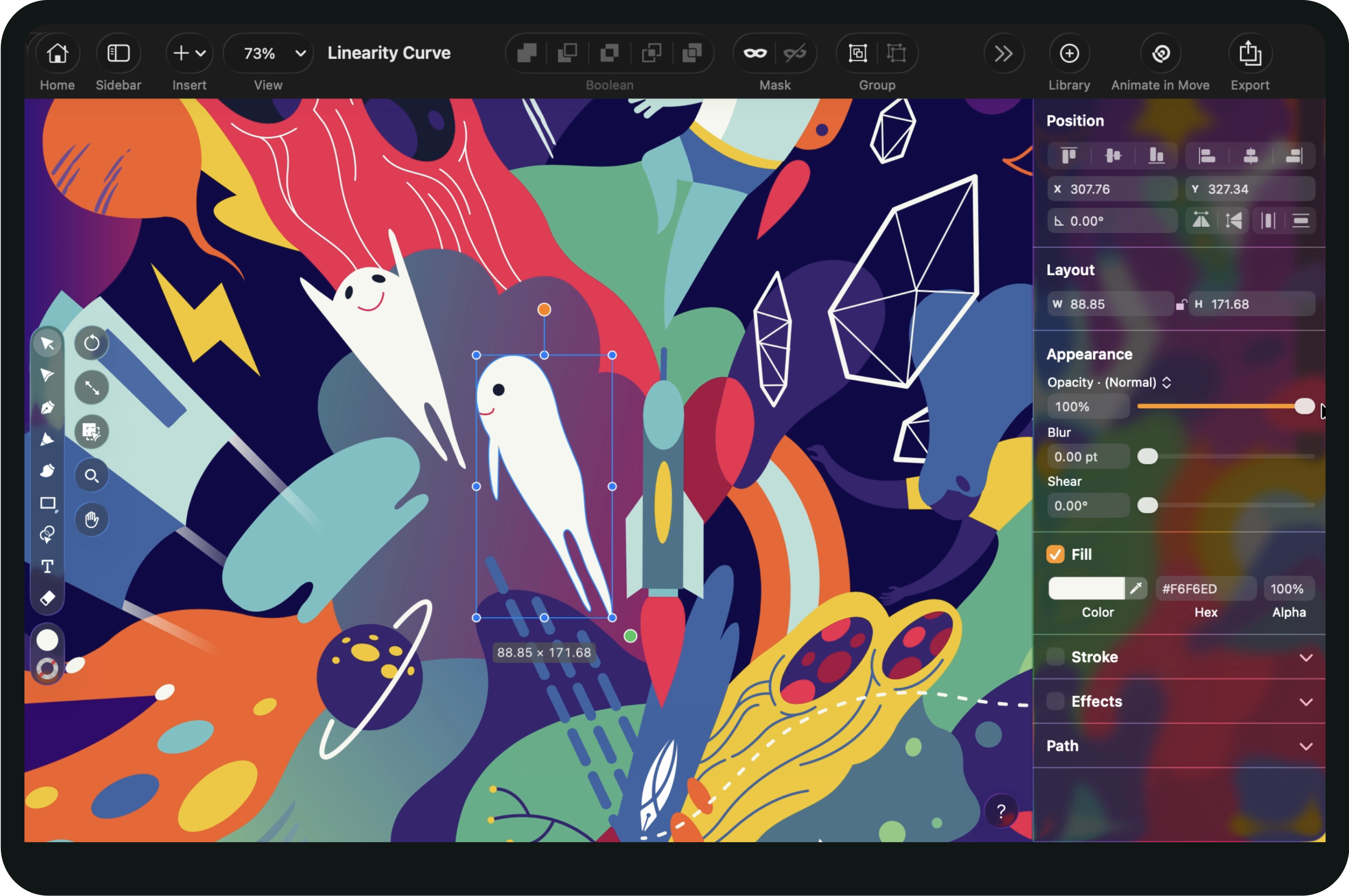
Why choose Linearity Curve over Affinity Designer?
Affinity, formerly Affinity Designer, now a unified free app from Canva, is a capable professional design tool, but today, Linearity Curve offers a simpler and more user-friendly experience. It’s got a clean, easy-to-use interface and plenty of handy tools that work well for both experienced designers and beginners.
Linearity Curve is built to be easy to pick up, so you can focus on creating without getting lost in complicated menus or tools. With its vectorizing and raster editing tools, templates, and built-in asset libraries, designing has never been easier.
Features | Affinity | |
|---|---|---|
Auto Trace | ||
Millions of royalty-free images and icons | ||
Clean interface | ||
Background Removal | ||
Pen Tool | ||
Integrated Isometric Grid | ||
Figma, Adobe, Sketch import | ||
Customizable templates | ||
Native iPad app | ||
No account required |
Design up to 30% faster
with features like our Quick Actions bar, Background Removal, and templates.
Optimze with AI-powered tools
like Auto Trace, Background Removal, Magic Eraser and Super Resolution.
Collaborate with your team
in one shared workspace.
Vectorise anything
I had sooo much fun working with Curve new tools and brand colors - as you know - pink&orange is my favourite combo!


Product updates every week

How Linearity Curve fits into your design toolkit

Feel at home in the Apple ecosystem
Linearity Curve has the modern, clean, intuitive, and simple design of a native Apple application. The UI offers a beautiful interface with the powerful functionality for an optimal workflow.
Linearity Curve is built to look and feel like an Apple product, and to integrate seamlessly into your workflow.

Endless third-party importing options
Since Linearity Curve is built by designers for designers, we’ve experienced the pain of bad import and export options in other tools before as well. That's why we built a software that can be used completely standalone and in combination with other tools.


Auto Trace
Templates
Layers
Auto Trace
Linearity Curve saves you valuable time with AI-powered image tracing technology. Auto Trace chooses the best settings for your image but gives you the control to change them. Bring your photos and drawings to life in vectors.
Linearity Curve features at a glance
Linearity powerful suite of tools is ideal for designers of all levels.
Auto Trace
Instantly turn your raster images into vectors
Pen Tool
Define precise vector points and create custom paths with Bèzier curves.
Brush Tool
Freely draw editable vector paths.
Shape Builder
Quickly sculpt complex designs from multiple shapes
Background Removal
Remove photo backgrounds with the tap of a button.
Magic Eraser
Simplifies image editing by letting you quickly remove unwanted elements.




Frequently Asked Questions
There are many Affinity Designer alternatives available, including many different vector graphic design programs, such as Inkscape, CorelDraw, or Gravit Designer. Other programs support both raster and vector graphics, like Gimp.
In terms of layout and design, Affinity Designer is the most similar to Adobe Illustrator, and designers who are familiar with either one will find it fairly seamless to switch.
However, for designers who haven't spent years learning the complex submenus of Adobe Illustrator, both programs can be difficult to learn. That's why you should try Linearity Curve (formerly Vectornator)! It's the perfect alternative to Affinity Designer because it's built from the ground up to be intuitive and easy to learn, but powerful enough to keep up with your design workflow.
Many designers are looking for a vector graphic design software platform with a free version. Unfortunately, Affinity Designer doesn't have a free version.
Whether you're on iOS, Linux, or Windows, you'll be able to find an open-source or free graphic design platform if you look hard enough. It just depends on your use case - whether you need something like Adobe Photoshop for photo editing and working on raster images for social media (check out Gimp and its many plugins) or something like Affinity Designer or Adobe Illustrator to edit vector shapes and images, such as logos and typography.
If vector editing is what you need, look no further than Linearity Curve (formerly Vectornator). You'll have all the tools you need at your disposal for free! Plus, with features like Quick Actions bar, Background Removal, Auto Trace, and more you'll be able to work up to 30% faster than in other vector design platforms. And with our library of templates, it's easy to design projects directly for the devices you intend them to be viewed on. Try it out for free today on iPad, macOS, and iPhone.
Linearity Curve offers mobile versions for iOS and iPadOS, providing a consistent experience across different platforms. Affinity Designer is available on Mac, Windows, and iPad, but users will not be able to use it on their iPhone.
Every document created in Linearity Curve automatically syncs to all devices with Linearity Cloud and will appear in your Homescreen library. However, with Affinity Designer, you need to manually open or import files from iCloud or your device.
Linearity Curve features in-app learning material, including an in-depth User Guide and a library of video tutorials. While Affinity Designer does offer some online learning materials, they fall short in terms of comprehensiveness and accessibility when compared to Linearity Curve's resources.
Linearity Curve's intuitive user interface, streamlined workflow, in-app learning resources, and visual learning aids collectively contribute to a more user-friendly experience compared to Affinity Designer. This ease of use benefits both beginners looking to get started quickly and experienced designers seeking an efficient and accessible tool for their graphic design projects.
Linearity Curve is gearing up to include built-in collaboration features in the near future.
This will allow real-time collaboration between team members, making it easier for multiple designers to work together on projects simultaneously. Affinity Designer may require external collaboration tools.
Compare us with other apps



:quality(75))
:quality(75))