Spotify size guide: podcast covers, playlist covers, and album covers

Spotify image sizes vary by asset type — profile avatars display at 750×750px, album and podcast covers should be submitted at 3000×3000px, playlist covers at a minimum of 300×300px, and Canvas visuals at 1080×1920px. This guide covers every Spotify image format with exact dimensions, file size limits, and practical design tips for artists, podcasters, and designers.
Are you trying to find the right size for your Spotify profile picture, album covers, or playlist covers?
In this comprehensive Spotify size guide, we'll give you all the info you need to ensure your images are perfectly sized and optimized for the popular music and podcast platform.
If you're an indie musician or a designer working with bands and podcasters, this guide's for you.
Spotify image sizes table
| Image type | Size | Max file size | Accepted formats |
|---|---|---|---|
| Profile avatar | 640 x 640px (min), 750 x 750px (recommended) | 20MB | TIF, JPEG, PNG |
| Header image | 2660 × 1140 px (min 690 × 500 px) | 20MB | JPEG, PNG |
| Playlist cover | 300 x 300px | 4MB | JPEG, PNG |
| Cover art for tracks and albums | 2400 x 2400px | N/A | JPEG, PNG, TIF |
| Gallery images | 690 x 500px | 20MB | JPEG, PNG |
| Podcast cover | 3000 x 3000px (minimum 1400 x 1400px) | 512KB | JPEG, PNG |
| Episode cover art | 3000 x 3000px (minimum 1400 x 1400px) | 512KB | JPEG, PNG |
| Canvas | 1080 × 1920 px | Up to 200MB | MP4, JPG |
Canvas videos must be 3–8 seconds long. MP4 format, HD (1080p) recommended.
Spotify profile picture size
Your Spotify profile picture, also known as your avatar, should be 750 x 750px. This square image will appear cropped in a circle next to your name on your Spotify profile and playlists.
Choose a photo or logo that represents you or your brand effectively, as it will be the first thing users see when they come across your profile.
Spotify also has some extra guidelines you must follow to ensure your image won't be removed. Your avatar should:
- Be free from offensive imagery
- Not include text
- Not promote products or upcoming releases
- Not have a busy background
- Keep to Spotify's copyright policy

Spotify playlist cover size
Playlists can be private or shared with other users on Spotify. You can also add it to your profile, so if you want to keep a consistent aesthetic across your Spotify account, consider creating a custom visual that aligns with your brand.
The playlist cover art size should be minimum 300 x 300px. This smaller size still allows for high-quality images that showcase the theme or mood of your playlist.
Make sure the cover art reflects the content and makes it easily recognizable.


Spotify album cover size
When uploading music to Spotify, your album cover should be a minimum of 2400 x 2400px. It must be square without borders or letterboxing (black borders at the top and bottom, like a widescreen effect).
Album art is submitted through your music distributor (DistroKid, TuneCore, etc.), not directly through Spotify. Use sRGB colour space at 24 bits per pixel. Don't upscale low-resolution images, they may be rejected.

Image source: Spotify
Spotify header image size
The Spotify header image should be at least 690×500px, with a recommended size of 2660×1140px. This wide landscape banner appears at the top of your artist profile page. Keep important content in the upper two-thirds of the image, the bottom portion is overlaid by your artist name, monthly listener count, and action buttons.
This large banner will appear at the top of your artist profile page and is a great opportunity to showcase your brand or latest release.
Remember to keep important information within the safe zone (the center of the image) to ensure it's visible on all devices.
Ready to create brand assets that pack a punch?
Visit our Academy for free marketing design courses.
Spotify podcast cover size
For your podcast profile avatar, a size of 750 x 750px is recommended to make your image clear and eye-catching. This square image will be displayed next to your podcast name on Spotify, so choose a photo or logo that effectively represents your podcast.
For podcast covers, the recommended size is 3000 x 3000px, with a minimum of 1400 x 1400px. This image will be the main visual representation of your podcast on Spotify, so make sure it reflects the theme and content of your show.


Let's look at some eye-catching podcast covers and figure out why they work so well design-wise.
Empire podcast

Image source: Spotify
In this podcast cover, the title spans across the entire image width and the font is bold. The background is somewhat busy but brings across the idea of old maps, flags, and war imagery without overshadowing the title text.
The diary of a CEO podcast

Image source: Spotify
This podcast takes an unconventional approach and uses portrait photography to put the host front and center. The host is a former CEO and interviews various CEOs about their experiences and insights into some of the most contentious topics in business.
Each episode cover also features a portrait photo of the interviewee with the same dark background. Using the same background with different images helps create a podcast brand or aesthetic that's instantly recognizable.
Philosophize this! podcast
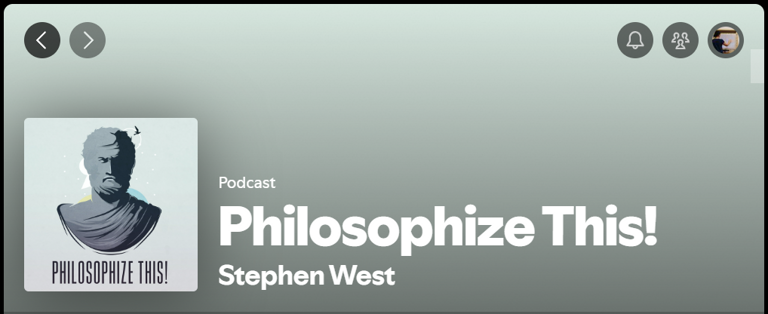
Image source: Spotify
An educational podcast focused on introducing the listener to the foundational concepts of philosophy today, Philosophize this! has a simple vector illustration of Plato in a calm color palette. All the episodes have the same cover.
Its simplicity draws your attention and evokes the aims of the podcast: to simplify philosophy for those who aren't studying it at tertiary level.
Canvas guidelines
Spotify's Canvas feature enables you to upload a looping video of three to eight seconds long. This visual can be viewed on mobile and is meant to enhance the listening experience on mobile.
You can create your canvas visual in SD (720p) or HD (1080p). It must have a 9:16 portrait aspect ratio.
Try to keep the looping visual in line with your brand and also help tell the story of the track the user is listening to.
Design for other platforms
Using the correct image sizes on Spotify is essential for a professional and visually appealing presence on the platform. Whether you're a musical artist, designer, or just a music lover creating playlists, following this size guide will help you create stunning visuals that stand out to your audience.
You can also check out our other size guides for updated image and video sizes for the most popular sharing platforms:
You'll need design software to make custom visuals for all your profiles and resources. Check out Linearity Curve for creating vector and raster designs. It offers advanced yet easy-to-use features:
- AI-powered image background editing.
- Auto Trace to turn sketches and raster images into vectors instantly.
- Pen Tool, Brush Tool, and Shape Tools to create custom graphics.
- Advanced color palette and font management.
- Seamlessly integrated with Linearity Move so you can animate your static graphics with a few clicks.
Ready to try new and innovative design software? Get started for free below or check out our special pricing for pros, teams, and education.
For image size specifications across every major platform in one place, see the social media image sizes guide.
Jumpstart your ideas with Linearity Curve
Take your designs to the next level.
Admins and Editors can manage their artist profile by updating the avatar, header, and gallery.
- Avatar: your profile image that appears in search results and on the Spotify mobile app.
- Header image: a cover image that appears at the top of your profile in the Spotify desktop app and web player.
- Image gallery: multiple scrollable images that appear in the About section of your profile.
The Spotify Canvas visual is a unique opportunity to enhance your audience's mobile listening experience. By uploading a looping video with a 9:16 portrait aspect ratio, you can add an extra layer of visual interest to your tracks.
When designing your Canvas visual, consider how it aligns with your brand and the story of the track being played. Keeping it in line with your overall aesthetic.
It's not necessary for all episodes of your podcast to have the same cover, but having a consistent aesthetic can help create brand recognition and make your podcast easily identifiable to listeners.
Yes, you can use a photo for your podcast cover on Spotify. Ensure the image is high quality and follows the recommended size guidelines of 3000 x 3000px.


App of the Day
6.1K ratings
Get Started for free

Design in Curve.
Create sharp, scalable designs with intuitive tools for logos, illustrations, and professional branding.

Animate in Move.
Effortlessly create animations for social media, online ads, and motion graphics.
Trusted and used by leading brands


