Linearity just got a new look — Liquid Glass.
A cleaner, faster, more modern UI that makes design feel effortless.

What’s Happening?
Apple is releasing a whole new look and feel to software with a new design system nicknamed Liquid Glass. It brings a single, consistent look to iPhone, iPad, and Mac.
At Linearity, we’ve adopted this new design and updated how Linearity looks, feels, and behaves.
Why Linearity Adopted Liquid Glass
We wanted your workspace in Curve to feel as fluid, modern, and precise as the designs you create. It makes Curve feel at home on all Apple devices.
It unifies the interface, strengthens the iPad experience, and makes complex designs easier to understand. The design provides a calm, focused workspace while giving a stable foundation for future features with Apple’s APIs and Foundation Models.
What’s Changing in Linearity?
While Liquid Glass improves the experience across all Apple devices, our main focus has been the iPad. Apple has been steadily transforming the iPad into a true laptop alternative. In a 2015 interview, Tim Cook said:
The iPad Pro is a replacement for a notebook or a desktop for many, many people.
To align Linearity Curve with that vision, we’ve redesigned the workspace to make professional-grade tasks feel natural.

On the iPad, the new two-column Inspector lets you browse and edit side by side, adapting dynamically to window size.

On the iPhone, touch targets, spacing, and gestures have been refined for smoother and more comfortable interaction, even with one hand.

The “New Document” workflow has been redesigned. Templates and recents adapt to context, helping users start new projects efficiently.

Linearity Curve now integrates Apple Intelligence and Foundation Models.
You can generate color palettes with simple natural language prompts like “Create a soft pastel palette for a spring campaign” and instantly get a palette you can use, save, or modify.

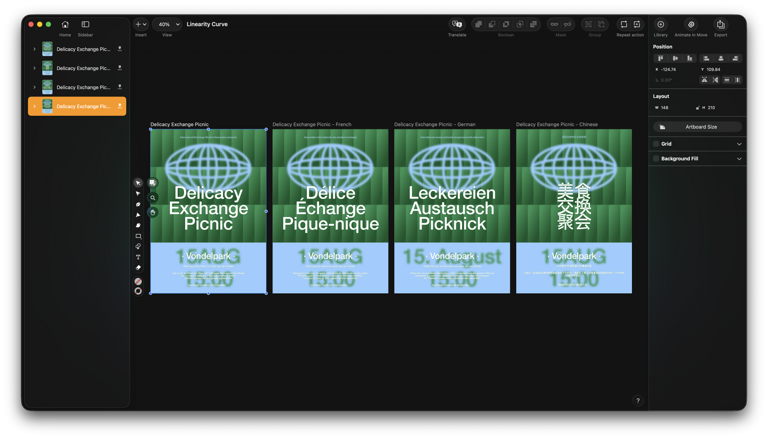
Automatic translation is also built in: select a language, and your designs, including text and labels, are recreated seamlessly.


How to Get
Curve with Liquid Glass is shipping alongside the public release of iOS 26, iPadOS 26, and macOS 26. You’ll need to update both your Apple device and Linearity Curve or Move.
To use smart on-device features like content-aware adjustments and automatic translations, make sure Apple Intelligence is enabled on your device.

Learn how to enable Apple Intelligence.
Read moreTry it Out, No Sign-Up Required
Linearity Curve is fully accessible, no account required to try, design and export or explore.
📣 Got feedback or found something that could be better? Let us know at feedback.linearity.io
💬 Need help? Reach us anytime at support@linearity.io
Linearity is evolving with the future. This update helps us on our mission towards fast, fluid, and delightful design.
Vector Design That Feels Effortless
Create illustrations, logos, brand assets and more on Mac, iPad, and iPhone.

Nothing will change for you. You’ll continue to use Curve in the existing interface. The new Liquid Glass UI is only available on iOS 26, iPadOS 26, and macOS 26.
First, make sure your device is running the latest OS. Open Settings (on iPhone/iPad) or System Settings (on Mac), then navigate to General > Software Update. If an update to iOS 26, iPadOS 26, or macOS 26 is available, follow the on-screen instructions to download and install it.
Next, update the Curve app through the App Store:
- Open the App Store on your device.
- Tap your profile icon at the top right.
- Scroll to find available updates.
- Locate Curve and tap Update.
Once both updates are complete, restart your device to ensure all enhancements are applied. Open Curve, and you’ll see the new Liquid Glass interface, improved workflows, and smart new features ready to explore.
Apple allows OS rollback only if you have a backup from before the update. Make sure to save a backup via iCloud or Finder/ iTunes before upgrading if you might want to revert.
Some features, like the two-column iPad Inspector, require newer iPads running iPadOS 26. Older iPads may not support all enhancements, though basic functionality remains intact.
No. The new OS triggers the Liquid Glass interface automatically, so the updated UI is the default experience.
Curve with Liquid Glass is optimized to run smoothly. On supported devices, you should see no negative impact on performance.
All smart features run on-device, so your data stays private. No content leaves your device.
You don’t have to update right away. Curve will continue to function on your current OS, but updating ensures access to the latest interface and features.
:quality(75))
:quality(75))
:quality(75))

App of the Day
6.1K ratings
Get Started for free

Design in Curve.
Create sharp, scalable designs with intuitive tools for logos, illustrations, and professional branding.

Animate in Move.
Effortlessly create animations for social media, online ads, and motion graphics.
Trusted and used by leading brands


